Reading a Basic Auth handshake straight out of the wire
A packet capture, a text-mode browser, and a password sent in the clear. Here's how five HTTP requests inside webserver.em0.pcap gave up a working set of admin credentials — no exploit required, just Wireshark and patience.
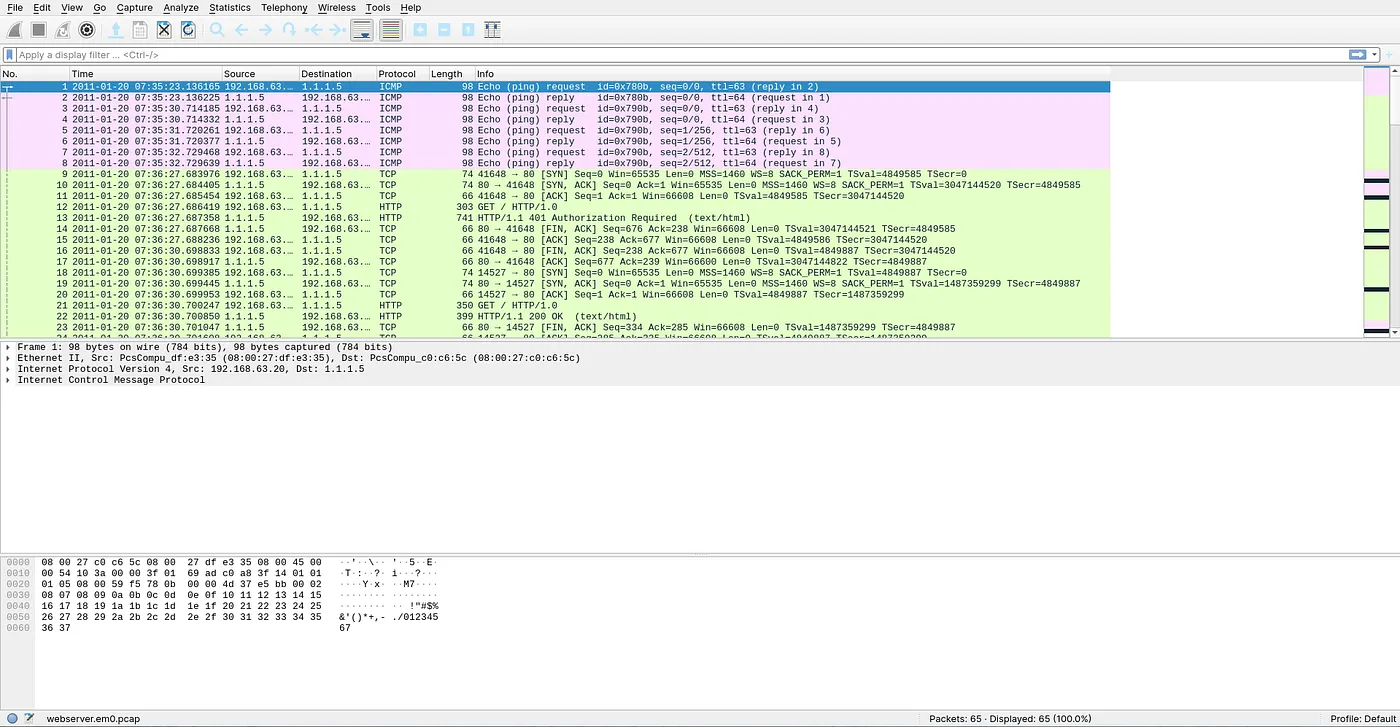
A log entry flagged something worth a second look, and the job was to reconstruct it from a raw capture: webserver.em0.pcap, 65 packets, a mix of ICMP pings and an HTTP conversation between a client at 192.168.63.100 and a server at 1.1.1.5. No alerts, no annotations — just packets, and the question of what actually happened between those two hosts.
65 packets total — ICMP handshake up top, HTTP conversation below it.
Q1how many GET requests?
Counting the requests
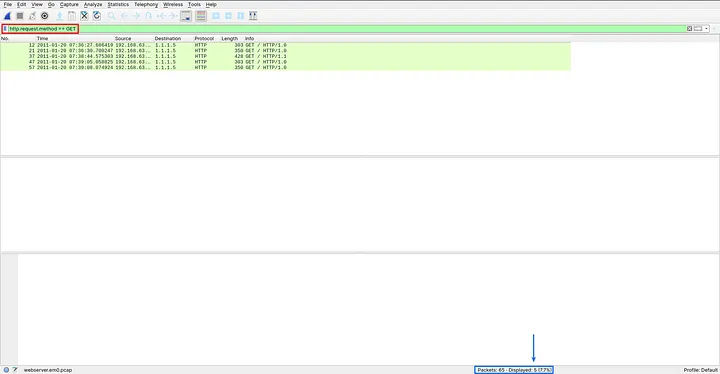
Rather than scroll and count by eye, a display filter narrows the list down to exactly what matters — and Wireshark's status bar does the counting for you.
http.request.method == GET
Bottom-right status bar: 5 displayed out of 65.
answer
5 GET requests in the capture.
Q2–Q4packet 13 · Follow HTTP Stream
Fingerprinting the server
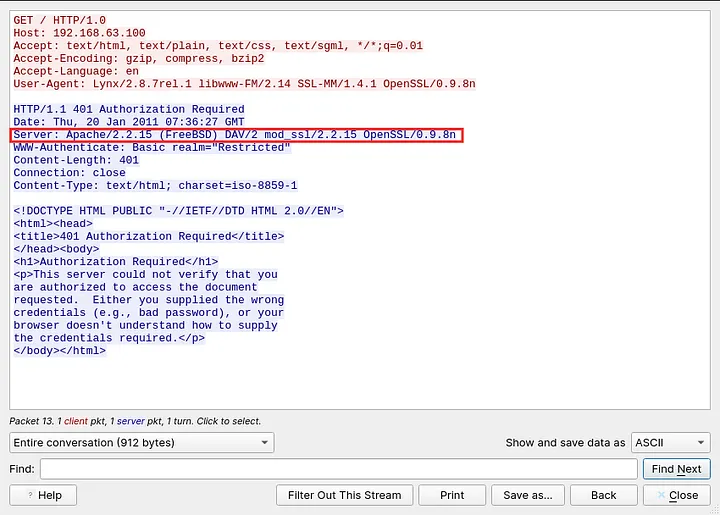
Every HTTP exchange is a request paired with a response, and the response's Server header is a server telling you exactly what it's running — software, OS, and SSL library, all on one line. Right-click any HTTP packet, choose Follow → HTTP Stream, and the whole conversation reassembles into one readable block.
The Server header, highlighted in the reassembled stream.
One header, three answers: the operating system, the web server build, and the SSL library — exactly the banner an attacker would fingerprint before picking an exploit.
answer
OS: FreeBSD · Web server: Apache/2.2.15 · SSL: OpenSSL/0.9.8n0.9.8n predates the Heartbleed era — a real box on this stack would be a priority patch target.
Q5request header, same stream
What was doing the asking
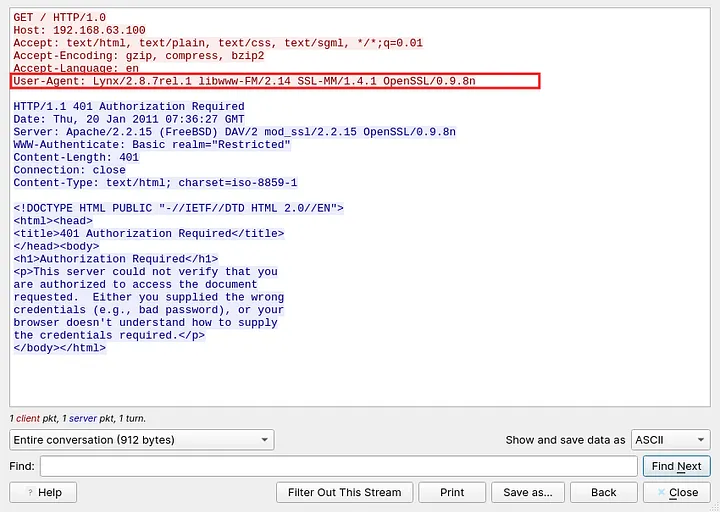
Where Server identifies the responder, User-Agent identifies the requester. Same technique, same stream, just reading the other side of the conversation.
The client's User-Agent, on the request side of the stream.
answer
Lynx/2.8.7rel.1 libwww-FM/2.14 SSL-MM/1.4.1 OpenSSL/0.9.8nLynx is a text-only, terminal-based browser — not typical end-user traffic. More consistent with scripted access or minimal-footprint recon than someone casually browsing.
Q6–Q7packets 13, 22, 36, 48, 58
401, then 200 — and the credentials in between
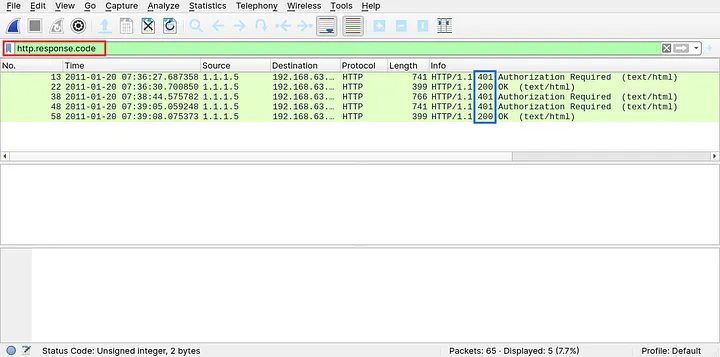
The capture holds exactly two response codes, easy to isolate:
http.response.code
401 Unauthorized, then 200 OK — twice over.
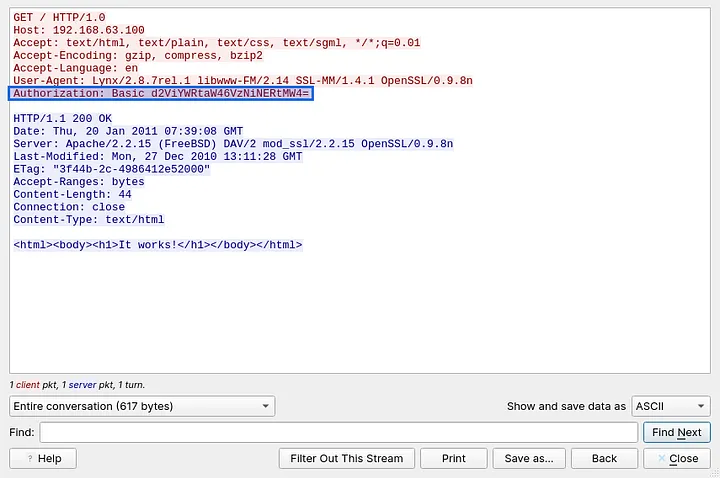
401 Unauthorized means the request arrived without valid credentials. 200 OK means the next attempt succeeded. Filtering down to the successful exchange and following that stream surfaces the Authorization header the client sent along with it:
http.response.code == 200
Authorization: Basic, followed by a Base64 blob.
Authorization: Basic d2ViYWRtaW46VzNiNERtMW4=
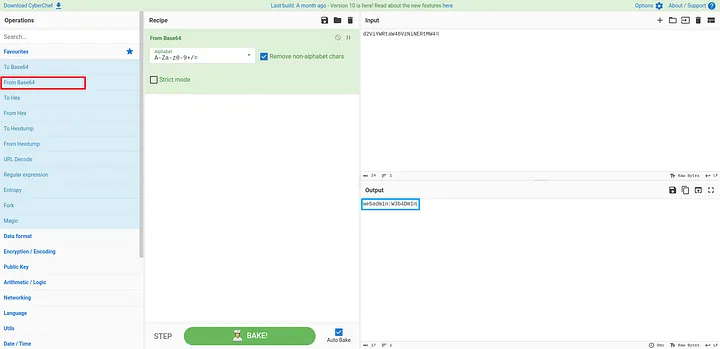
HTTP Basic Auth is encoding, not encryption — Base64(username:password), reversible by anyone who can see the packet. Dropping the string into CyberChef's From Base64 operation confirms it in one step:
From Base64 — recipe of exactly one operation.
answer
Username: webadmin · Password: W3b4Dm1nSent in the clear over HTTP/1.0 — no TLS anywhere in this capture.
What actually happened here
A client running the Lynx text browser attempted an HTTP Basic Auth login against an Apache 2.2.15 server on FreeBSD, over a plain, unencrypted connection. The first attempt bounced with a 401; the retry, carrying a Base64-encoded Authorization header, succeeded with a 200. Because Basic Auth performs no encryption of its own and nothing here was wrapped in TLS, the credentials — webadmin:W3b4Dm1n — were sitting in plaintext for anyone in a position to capture the traffic.
That's the whole story: not a clever exploit, just credentials handed over a channel that was never protecting them.
T1040 — Network SniffingT1552.001 — Unsecured Credentials: Credentials In Files/Traffic
Enforce HTTPS/TLS on every authenticated endpoint — Basic Auth should never travel over plain HTTP.
Move off Basic Auth toward a token- or session-based scheme where the stack allows it.
Patch the web server stack: Apache 2.2.x and OpenSSL 0.9.8n are both long past end of life.
Watch for the 401-then-200 pattern in logs — a signature of credential brute-forcing or guessing, not just normal retries.